
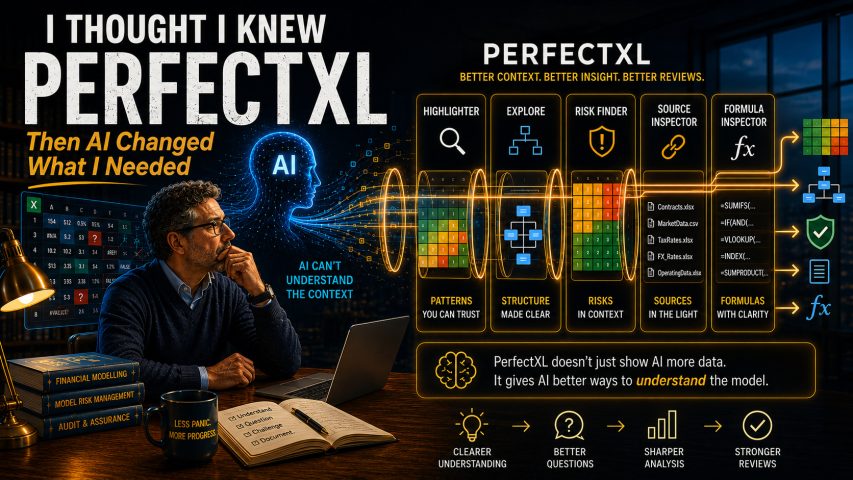
I Thought I Knew PerfectXL
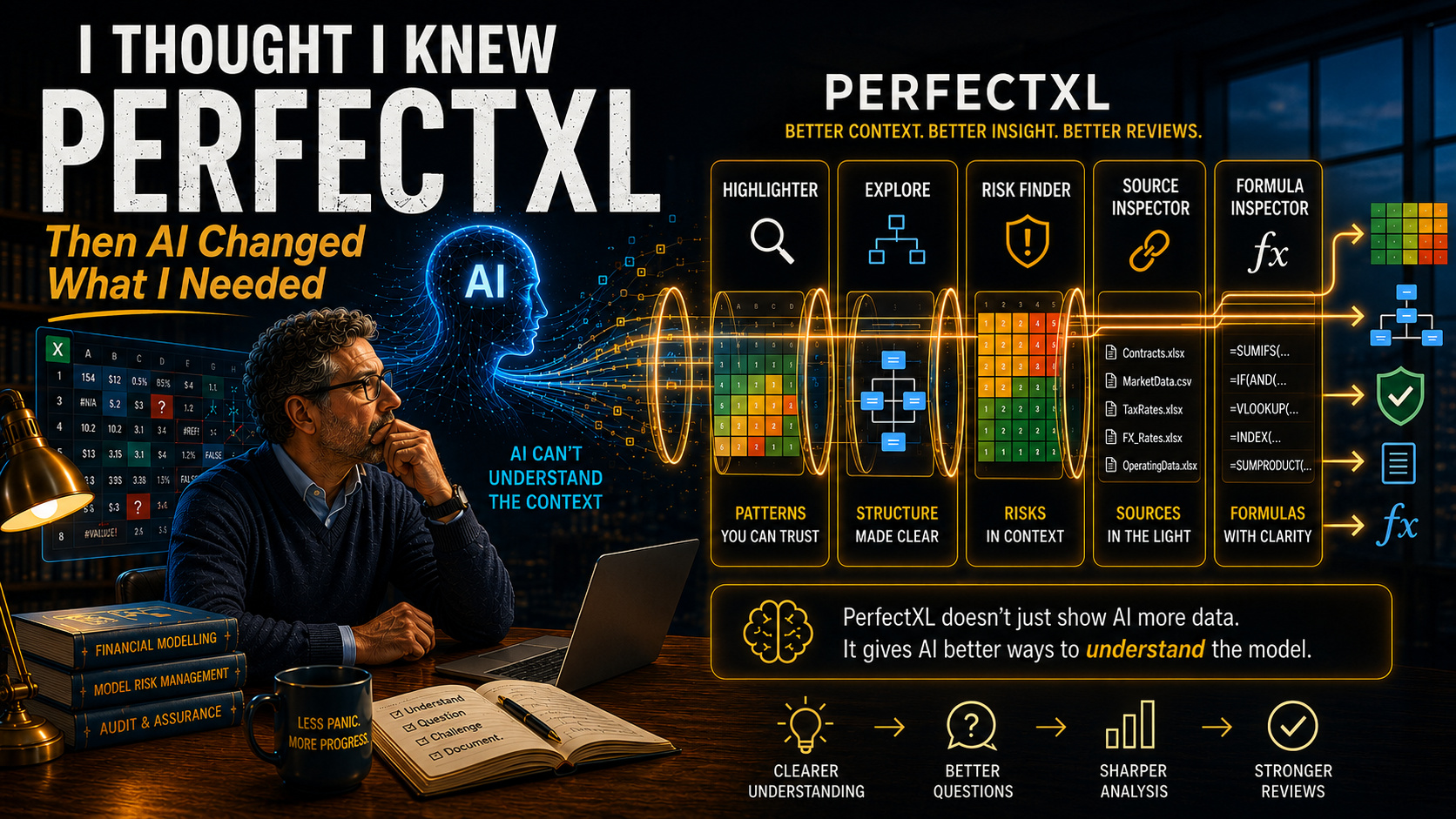
Five Capabilities I Now View Differently in an AI-Assisted Model Review
A few months ago, I asked AI to review a financial model.
That sentence sounds considerably more impressive than the event itself. What actually happened was that I provided a workbook, asked a reasonably intelligent question, received a remarkably confident answer and then spent the next twenty minutes deciding whether the AI had genuinely understood the model or was simply doing what AI occasionally does best: speaking very convincingly about something it only partially understands.
The experience reminded me of a bright graduate on their first day in project finance: intelligent, enthusiastic, eager to help and completely lost.
This was not an unusually exotic workbook. It was a fairly conventional financial model containing inputs, calculations, financing schedules, assumptions, outputs and sensitivities. The sort of model many of us encounter regularly, although perhaps with one or two worksheets that had clearly experienced a difficult upbringing.
And yet AI struggled.
The problem was not necessarily intelligence. The problem was context.
That distinction matters. I increasingly believe it may become one of the defining distinctions in AI-assisted financial model review.
When I began experimenting with AI-supported reviews, I expected AI to change the way I worked. What I did not expect was that it would change the way I looked at PerfectXL.
I had evaluated PerfectXL years earlier. I respected the product, liked its visual approach and recognised the value of several of its features. At the time, however, I chose OAK as my primary technical review tool because its Map and reviewer-oriented insights more directly addressed my immediate requirement: helping me decide where to look first.
That was a sensible decision for the workflow I had then.
When I returned to PerfectXL recently, I assumed I already understood what it offered. I expected a more mature version of the suite I remembered: stronger visualisations, smoother workflows and additional functionality.
What I had not anticipated was that AI would make me value some of PerfectXL’s capabilities for entirely different reasons.
For years, I assessed review tools almost exclusively through the eyes of a human reviewer. Could the tool help me navigate the workbook, expose inconsistencies, identify technical risks and collect evidence?
Those questions still matter. AI simply added another:
Can this tool help provide the structure that AI needs to work usefully with the model?
That was not a question I asked when I first tested PerfectXL. Today, it may be one of the more interesting questions we can ask about any spreadsheet review suite.
In my experiments, the particular large language model often mattered less than the quality and structure of the material supplied to it. Raw workbook information produced inconsistent results. Structured information about the workbook produced far more useful ones. The summaries became more coherent, the explanations became more relevant and, most importantly, the questions I could formulate became sharper.
The AI had not become smarter. The context had become better.
PerfectXL did not become more valuable simply because AI arrived. PerfectXL became more valuable because AI changed what I needed from a review tool.
A brief note on the evidence
This article draws partly on an output-based comparison in which I assessed PerfectXL Highlighter and OAK Map on the same financial model. The exercise examined the generated workbooks, their structure, issue visibility, documentation value, machine readability and privacy footprint. It was not a controlled benchmark of runtime, every PerfectXL product or different AI systems.
The clearest PerfectXL advantage in that test was not that it created more review findings. It was that the Highlighter produced a highly structured Formula & Data Patterns Summary that was comparatively easy to filter, extract and convert for further analysis.
The broader PerfectXL suite extends beyond Highlighter. Explore, Risk Finder, Compare, Source Inspector and functions within the Excel add-in address different aspects of spreadsheet analysis. The five areas below therefore combine findings from my Highlighter test, documented capabilities of the wider suite and practical AI workflows that I believe are worth testing.
They are proposed workflows, not claims that AI has independently reviewed or understood a model.
That may sound rather cautious.
It is.
Model reviewers tend to appreciate caution. It gives us something useful to do while everybody else is promising transformation.
Five PerfectXL Capabilities I Now View Differently
1. Highlighter: Formula and Data Patterns
The most compelling PerfectXL output in my own test was the Formula & Data Patterns Summary.
Previously, I would mainly have regarded it as a consistency and documentation aid. It groups recurring formula logic and helps expose where one part of a workbook behaves differently from another. That is already useful to a reviewer.
For AI, however, the structured pattern information has another advantage. It turns thousands of individual formulas into something closer to a vocabulary.
A raw workbook might contain many thousands of formula cells. Asking AI to reason directly about all of them is rather like handing someone a telephone directory and requesting a psychological profile of the town. A structured pattern summary is different. It allows us to describe repeated logic, identify formula families and isolate deviations without pretending that every difference is an error.
This matters because AI is often far more useful when reasoning about explicit patterns than when confronting a mass of disconnected cell references.
Try it yourself
Give AI: A sanitised extract of the Formula & Data Patterns Summary containing the relevant sheets, ranges and formula groups.
Ask:
Based only on the supplied extract, describe the principal formula-pattern groups and identify deviations that may deserve reviewer attention. Do not classify a difference as an error. For each relevant deviation, propose the questions a reviewer should answer before deciding whether it is intentional, acceptable or a potential finding.
Verify: Return to the workbook. Confirm that supposedly comparable blocks really are comparable, that scenario or timing differences do not explain the variation and that the AI has not inferred relationships unsupported by the evidence.
The goal is not automated error detection.
The goal is a better route into investigation.
AI may struggle with an unstructured workbook. It can be remarkably useful when reasoning about structured patterns.
2. Highlighter: Consistency and Highlighted Exceptions
PerfectXL Highlighter makes formula and data consistency visible by assigning temporary visual classifications to cells and exposing formula patterns, data types, errors and other characteristics.
The important word is visible.
A highlighted exception is not automatically a finding. It is a candidate for attention.
That distinction becomes particularly important when AI enters the process. AI is very good at transforming a technical observation into fluent prose. Unfortunately, fluent prose can make a hypothesis sound like a conclusion before the underlying evidence has had time to put its coat on.
The safer question is therefore not:
Which of these cells are wrong?
It is:
Why might these cells be different, and what should I verify?
Try it yourself
Give AI: A sanitised list of selected Highlighter exceptions with their sheet, range, pattern description and enough neighbouring information to make comparison possible.
Ask:
For each exception, provide a neutral description of what appears different, possible benign explanations, possible technical concerns, the additional evidence required and one concise reviewer question. Distinguish direct observations from inference.
Verify: Check whether the surrounding pattern is genuinely relevant, whether the difference is intentional, whether it affects model results and whether it could be commercially material.
This creates a sensible division of labour. PerfectXL exposes the difference. AI organises possible explanations. The reviewer decides whether the difference matters.
Not quite the autonomous digital auditor some conference slides have promised us.
Probably rather safer.
3. Explore: Workbook Structure and Orientation
An experienced reviewer begins constructing a mental map almost immediately after opening a model. We identify inputs, calculation modules, outputs, financing sections, scenario controls, checks and supporting schedules. Much of this happens before we consciously decide to do it.
AI does not necessarily arrive with the same orientation.
This is where PerfectXL Explore and the broader workbook-analysis environment become relevant. Structural views, worksheet information, formula listings, names, external links and other workbook characteristics can help transform a file from a collection of sheets into something closer to a described system.
No automatically generated overview can fully explain the commercial purpose of a financial model. A worksheet called Calc_3_Final_v2 may contain the most important logic in the transaction, despite its creator’s heroic attempt to conceal this fact from future civilisation.
But structured workbook information gives AI a better starting point.
Try it yourself
Give AI: A sanitised workbook inventory or relevant Explore output containing sheet names, major structural characteristics, formula concentrations and links.
Ask:
Based only on the supplied information, prepare a provisional architecture of the workbook. Identify likely input, calculation, financing, output and check modules. Separate direct observations from inferred classifications and list everything requiring human confirmation.
Verify: Correct misclassified sheets, add commercial purpose and explain model architecture that cannot be inferred from workbook structure alone.
The useful result is not a perfect model map. It is an initial orientation and a clear description of what remains unknown.
Before AI can discuss a model sensibly, it first needs to know where it is.
4. Risk Finder and Source Inspector: Risk and Source Context
A financial model is not a collection of formulas. It is a network of consequences.
Revenue affects EBITDA. EBITDA affects cash flow. Cash flow affects debt service. Debt service affects distributions. Distributions affect returns. One assumption can travel through a model with the enthusiasm of gossip in a small village.
Human reviewers naturally think in these chains. AI needs sufficient source, relationship and risk context before it can do the same.
The wider PerfectXL suite contains functionality relevant to spreadsheet risks, external sources, workbook links and structural analysis. Those capabilities need to be attributed to the correct application; a Formula & Data Patterns Summary alone does not prove every dependency or explain the commercial effect of every source.
With appropriate Risk Finder or Source Inspector evidence, however, AI can assist in organising technical signals into a preliminary review plan.
Try it yourself
Give AI: A sanitised extract from the relevant PerfectXL application containing the necessary risk or source evidence.
Ask:
Based only on this extract, group the technical indicators by theme and convert them into a provisional review plan. For each group, distinguish facts, reasonable inferences and missing context. Do not assign commercial materiality or conclude that an item is a finding.
Verify: Confirm source relevance, direction of relationships and actual impact within the workbook. Challenge every causal statement that cannot be traced to evidence.
The point is not that AI suddenly understands the transaction.
The point is that it can help the reviewer turn structured evidence into a more organised investigation.
5. Turning PerfectXL Outputs into Documentation
This is a downstream AI use case rather than one isolated PerfectXL feature, but it may be one of the most practically valuable combinations.
Historically, documentation has often been treated as something produced after the model has been understood, reviewed and handed over. Someone closes the technical work, makes the final changes and then remembers, usually during a quiet moment of regret, that a model overview was also promised.
AI-assisted workflows can change that sequence.
Documentation can become one of the ways in which understanding is tested. When structured PerfectXL outputs cannot be converted into a coherent explanation without substantial speculation, that may tell us something important: either the evidence package is incomplete, the prompt is poor or our own understanding is not yet as settled as we thought.
PerfectXL’s outputs can therefore support model overviews, review briefings, onboarding material and handover notes. AI provides the drafting layer, while the reviewer supplies purpose, context, judgement and verification.
Try it yourself
Give AI: A sanitised package containing relevant PerfectXL outputs and confirmed reviewer notes.
Ask:
Draft a one-page model overview for a new analyst. Separate confirmed facts, reasonable interpretations, unresolved questions and areas requiring reviewer caution. Do not invent commercial purpose, risk significance or model logic where these have not been supplied.
Verify: Check every substantive statement against the workbook. Remove invented explanations and ensure uncertainty has not disappeared merely because the prose became smoother.
The best AI-assisted documentation is not the version that sounds most authoritative.
It is the version that makes clear what is known, what is inferred and what still requires work.
A Practical PerfectXL-to-AI Workflow
The practical workflow is not:
Run PerfectXL → upload everything → ask AI to review the model.
My approach is closer to this:
1. Choose the appropriate PerfectXL product and output
Formula patterns, highlighted exceptions, workbook exploration, source inspection and risk analysis are different evidence sets. Combining them indiscriminately does not create richer context. It creates a larger pile.
2. Select rather than dump
Extract only the sheets, ranges, patterns or risk indicators relevant to the question. AI does not improve automatically because it receives more rows. Useful context requires relevance, not merely volume.
3. Sanitise before sharing
Remove full paths, personal names, client identifiers, workbook metadata, confidential assumptions and any information the intended AI environment is not authorised to receive.
4. Define the AI’s role narrowly
Ask for descriptions, groupings, hypotheses, verification questions or draft wording. Avoid asking AI to make the final determination that something is an error, a material risk or a reportable finding.
5. Require uncertainty to remain visible
Ask the system to separate direct observations, inferences, missing context and recommended verification steps.
6. Verify against the original workbook
A polished paragraph is not evidence. A plausible explanation is not evidence. The relevant formula, assumption, dependency, source document or contractual requirement remains the evidence.
7. Let the reviewer classify the result
Only the reviewer should decide whether an item is irrelevant, an observation, a best-practice recommendation, a technical finding or a material risk.
AI can assist with the route to that judgement.
It does not own the judgement.
Better Questions, Not Automated Findings
I initially expected structured PerfectXL outputs to help AI produce better answers.
What proved more valuable was that they helped me formulate better questions.
Without structured context, the questions remain generic:
Review this model.
Are there formula inconsistencies?
What are the main risks?
With structured evidence, they can become far more precise:
Why does this formula family differ from comparable blocks on the same worksheet?
What additional evidence would distinguish a deliberate exception from a broken pattern?
Which external sources are concentrated in important calculation areas?
What would a reviewer need to confirm before relying on this inferred relationship?
These are not automatically generated findings.
They are better starting points for professional enquiry.
Structured context should help us ask better questions, not automate conclusions.
Better Context Can Create False Confidence
There is a danger in improving AI context.
The output becomes more useful.
It also becomes more persuasive.
Most experienced modellers can recognise poor AI output. We notice generic observations, missing assumptions and explanations that sound as though they were assembled from three unrelated training manuals in a dark room.
The harder cases are the good ones.
The language is precise. The terminology is correct. The reasoning appears coherent. The answer refers to the supplied patterns and ranges. It looks ready for the report.
And it may still be wrong.
Better context does not turn a language model into a professional model reviewer. It does not provide commercial knowledge that was never supplied, establish lender materiality, interpret a financing agreement or distinguish every deliberate exception from a defect.
It makes AI better equipped to assist.
It also makes human challenge more important.
Better context does not eliminate judgement. It increases the importance of judgement.
AI-Ready Is Not Necessarily AI-Safe
The more structured and machine-readable a PerfectXL output becomes, the more tempting it is to pass that output directly into an AI workflow.
That temptation requires governance.
In the Highlighter export used for my own test, all 6,863 Link to Original rows contained path-bearing formulas. Those links were extremely useful for internal navigation, but they made the raw output unsuitable for uncritical external sharing or upload to an external AI environment.
This is a finding from that particular export, not a universal security judgement about every PerfectXL file. It nevertheless illustrates a broader point. Other outputs may also contain user names, organisation names, client identifiers, file locations, linked-workbook names or commercially sensitive model information.
A professional workflow therefore needs at least two evidence packages:
- an internal version preserving links and navigation;
- a sanitised version approved for the intended AI environment or external recipient.
The exact approach depends on the organisation, engagement terms, information classification and AI platform.
The underlying principle is simpler:
AI-ready is not necessarily AI-safe.
Side Note: Browser-Based Does Not Mean Platform-Independent
PerfectXL currently combines two different delivery models.
Based on clarification from the PerfectXL team, Highlighter and Formula Inspector operate within the Excel add-in layer and can be used in Excel for the web. That may allow browser-based workflows on operating systems beyond Windows, including Linux, subject to Microsoft’s own environment, requirements and limitations.
PerfectXL Explore and PerfectXL Risk Finder remain Windows desktop applications.
That makes the current suite neither wholly Windows-only nor fully browser-based. It is a hybrid: a more portable Excel add-in layer alongside deeper analysis products that still depend on Windows.
This is genuinely interesting. It may make parts of PerfectXL accessible to users working through Excel for the web without constituting native Linux, LibreOffice or platform-independent support.
As digital sovereignty, open standards and open-source software receive more attention, particularly in Europe, that distinction may become strategically significant.
It is not a criticism of PerfectXL.
In fact, its add-in layer places it in a more interesting position than I initially realised.
Understanding Comes Before Challenge
Looking back, the biggest surprise was not that AI changed financial model review.
It was that AI changed how I evaluated PerfectXL.
Formula and data patterns became more valuable because they created structured AI context. Highlighted exceptions became more valuable because they supported better review questions. Explore, Risk Finder and Source Inspector became more interesting because they offered different ways to describe the workbook before asking AI to interpret it. Documentation became more valuable because it moved from the end of the process into the process of understanding itself.
Not every capability sits in the same PerfectXL product. Not every output belongs in an AI system. And none of them removes the need for professional judgement.
But together they changed my perception of the suite.
I used to see PerfectXL primarily as a collection of spreadsheet analysis and review tools.
I increasingly see it as a collection of ways to make a model more understandable: for the reviewer, for the next analyst, for the documentation and, with the right safeguards, for AI.
That is a meaningful development.
It does not complete a model review.
It prepares the ground for one.
PerfectXL can help expose the model structure required for understanding. But understanding is not yet challenge. Attention must still be focused, review hypotheses must be tested and the reviewer must decide where an apparent inconsistency becomes a meaningful risk.
Understanding comes first.
Challenge comes next.
In the next article, I will look at the other side of my current workflow: how I use OAK outputs to focus attention, formulate review hypotheses and decide where a model deserves to be challenged.
Sources and Further Reading
- PerfectXL product documentation and walkthroughs for its current suite.
- PerfectXL Highlighter documentation and user guidance.
- PerfectXL release notes and installation requirements.
- Direct clarification from the PerfectXL team concerning the Excel add-in layer, Excel for the web and its Windows desktop applications.
- Personal output-based comparison of PerfectXL Highlighter and OAK Map using the same financial model.
- Research on spreadsheet auditing, formula-pattern analysis and spreadsheet risk.
- EuSpRIG publications on spreadsheet risk, governance and auditing practices.